
Good Webcams for Sharper Calls and Better-Looking Streams
As an Amazon Associate, I earn from qualifying purchases. Some links may earn us a commission at no extra cost to you.
A good webcam should deliver clear video, dependable focus, and controls that fit how you actually use it. A streamer may care about 4K, high frame rates, and manual image settings, while frequent video callers may get more value from auto-framing, integrated microphones, privacy features, or straightforward plug-and-play operation.
These seven picks cover creator-focused 4K video, AI tracking, business conferencing, eye-contact presentation, integrated lighting, affordable 4K calling, and simple 1080p use.
7 Webcam Picks
1. OBSBOT Tiny 2 — 4K PTZ With AI Tracking
The OBSBOT Tiny 2 combines a motorized PTZ design with 4K video, AI tracking, autofocus, voice and gesture controls, a 1/1.5-inch sensor, 60 fps capability, and HDR light correction.
Why consider it:
It is especially useful for presenters, streamers, and anyone who moves around during calls because the camera can actively follow the subject instead of relying entirely on a fixed frame.

- 【OBSBOT Tiny 2 - New Era of Webcam】Our 4K Webcam is equipped with 1/1.5" CMOS Sensor, which is...
- 【Superior AI-Tracking, Up 4 Tracking Modes】Our Tracking Webcam has fully upgraded the AI...
- 【Breakthrough Voice & Gesture Control】Our Webcam with Microphone introduces a groundbreaking...
Pros
- 4K video
- Motorized PTZ movement
- AI subject tracking
- 1/1.5-inch sensor
- Autofocus
- Gesture and voice controls
- Up to 60 fps listed
Cons
- More complex than a basic fixed webcam
- Motorized design is less compact than a conventional webcam
Trade-offs / Who should skip:
A fixed camera such as the Elgato Facecam 4K makes more sense if you stay seated and prefer manual image control over automatic tracking.
2. Elgato Facecam 4K — Creator-Focused 4K60 Control
The retained Elgato Facecam 4K supports 4K60 capture and uses a Sony STARVIS 2 CMOS sensor. Its original listing also highlights Camera Hub controls and 49mm lens-filter compatibility for users who want more control over their image.
Why consider it:
It is built around creators who want high-resolution video, higher frame rates, and more deliberate control over exposure and image settings.
- Ultra HD Clarity in Every Frame - Capture crystal-clear video in stunning 4K resolution at 60 FPS...
- DSLR-Like Image Quality - Enjoy sharp detail and vibrant color with a premium Sony STARVIS 2 CMOS...
- Creative Control with Camera Hub - Customize your visuals with powerful effects and settings using...

Pros
- 4K at up to 60 fps
- Sony STARVIS 2 sensor
- Detailed Camera Hub controls
- Supports 49mm filters
- USB-C connection
- Tripod-compatible mounting
Cons
- Fixed-focus design
- Works best with decent lighting
Trade-offs / Who should skip:
Choose the OBSBOT Tiny 2 if automatic framing and movement tracking matter more than manual creator controls.
3. Jabra PanaCast 20 — Personal 4K Conferencing Camera
The Jabra PanaCast 20 is positioned specifically as a personal conferencing camera with AI-powered 4K Ultra HD, intelligent zoom, lighting optimization, and plug-and-play operation.
Why consider it:
Its feature set is centered on work calls rather than streaming effects, making it a practical fit for frequent Teams, Zoom, and other video-meeting use.

- PICTURE PERFECT EVERYWHERE — Our PanaCast 20 Streaming Camera uses powerful built-in AI and an...
- INTELLIGENT ZOOM — Our video webcam for laptops includes intuitive, AI-driven intelligent zoom...
- OPTIMAL LIGHTING — This web camera for monitors features intelligent lighting optimization that...
Pros
- 4K Ultra HD
- AI-powered video features
- Intelligent zoom
- Lighting optimization
- Plug-and-play setup
- Compact personal-conferencing format
Cons
- Less creator-oriented than Elgato
- Does not provide motorized PTZ movement
Trade-offs / Who should skip:
Streamers who prioritize 4K60 capture, tracking, or extensive image controls have more flexibility with Elgato or OBSBOT.
4. iContact Camera Pro — Eye-Level 4K for Presentations
The iContact Camera Pro uses an unusual eye-contact-oriented design intended to position the camera at eye level while still allowing users to read scripts or information on screen. Its campaign listing specifies 4K video, Zoom certification, compatibility with Teams, Meet, and Webex, noise-cancelling microphones, and a privacy power cut.
Why consider it:
It addresses one of the common problems with remote presentations: looking at content on the screen while appearing to look away from the other participants.
No products found.
Pros
- 4K camera
- Eye-contact-oriented placement
- Zoom Certified
- Works with Teams, Meet, and Webex
- Noise-cancelling microphones
- Privacy power cut
- Desktop app included
Cons
- Specialized design is less relevant for casual streaming
- Screen placement matters more than with a conventional monitor-mounted webcam
Trade-offs / Who should skip:
A normal monitor-mounted webcam is simpler if you do not regularly present, read scripts, or spend long periods speaking directly to camera.
5. NexiGo N960E Plus — 4K Webcam With Integrated Ring Light
The NexiGo N960E Plus combines a 4K camera with a built-in ring light, RF remote, ToF autofocus, 1080p60 mode, 4x digital zoom, noise-cancelling microphones, an on-screen-display menu, and a privacy cover.
Why consider it:
The integrated light can simplify a desk setup when room lighting is uneven and you do not want to add a separate key light immediately.
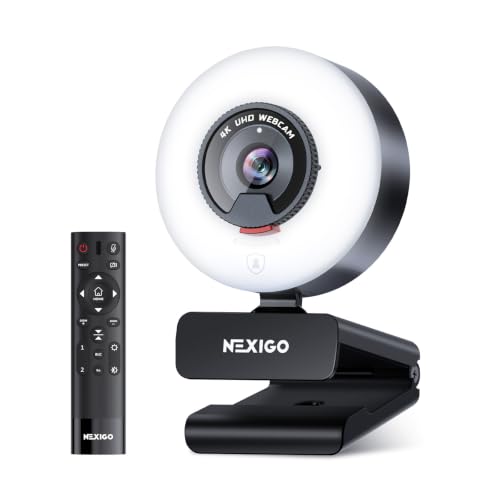
- 【Ultra HD 4K & Fluid 60 fps Streaming】Equipped with a 1/2.5" CMOS sensor, the N960E Plus...
- 【Instant ToF Autofocus That Keeps You Sharp】Powered by advanced Time-of-Flight (ToF) autofocus...
- 【Remote Control for Effortless Adjustments】Fine-tune your setup without leaving your seat. Use...
Pros
- 4K capture
- Built-in ring light
- ToF autofocus
- 1080p at 60 fps
- RF remote control
- 4x digital zoom
- Noise-cancelling microphones
- Privacy cover
Cons
- Integrated ring lighting cannot replace a larger dedicated lighting setup
- More controls and features than basic callers may need
Trade-offs / Who should skip:
Choose the EMEET C960 4K if you mainly want straightforward 4K video without the integrated-light and remote-control features.
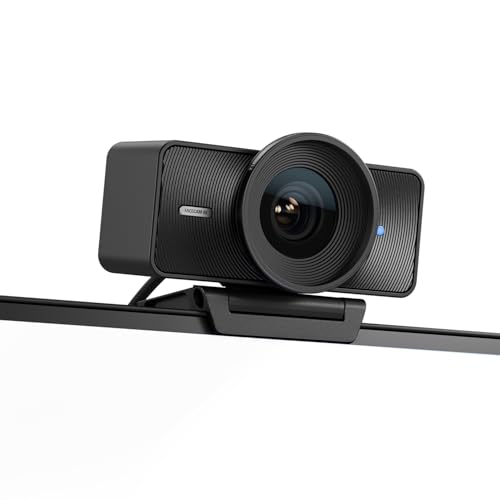
6. EMEET C960 4K — Straightforward 4K Calling
The EMEET C960 4K combines 4K video with PDAF autofocus, dual omnidirectional microphones, a 73-degree field of view, automatic light correction, USB-A connectivity, plug-and-play setup, and a privacy cover. Its listing specifically names Zoom, Teams, and Google Meet compatibility.
Why consider it:
It covers the core features many home-office users want without adding PTZ motors, remotes, or specialized creator controls.

- Unmatched Clarity with True 4K Resolution - Experience ultra-clear video conferencing with a genuine...
- PDAF Focus & Auto Light Correction - Equipped with PDAF automatic focusing technology, the EMEET...
- Dual Omnidirectional Mics - The built-in dual microphones capture voices clearly for crisp, natural...
Pros
- 4K resolution
- PDAF autofocus
- Dual microphones
- Automatic light correction
- 73-degree field of view
- Privacy cover
- Plug-and-play USB operation
Cons
- No motorized tracking
- Fewer creator-oriented controls than Elgato
Trade-offs / Who should skip:
Users who regularly move around during presentations may prefer OBSBOT, while dedicated creators may get more from Elgato’s manual controls.
7. Logitech C920s — Simple 1080p Video Calling
The retained Logitech C920s remains the conventional 1080p option. The original article lists 1080p30 video, autofocus, dual microphones, a 78-degree field of view, and an included privacy shutter.
Why consider it:
It handles ordinary work calls and everyday video communication without requiring 4K hardware or more complicated software features.
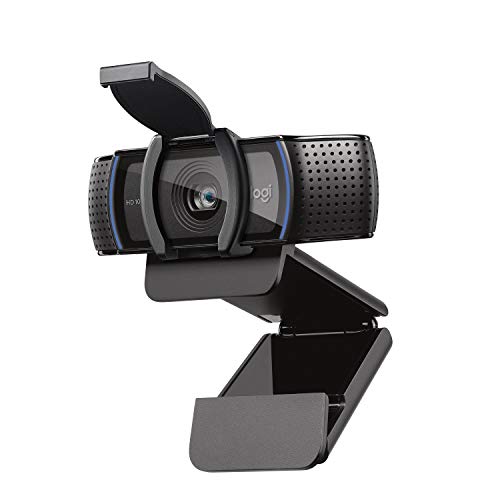
- Make a strong impression in your video conference calls with Logitech webcam with microphone that...
- Two microphones on this computer camera for desktop capture more realistic sound from a broader...
- Easily create, record, and customize settings with our Capture app. A suite of features on this...
Pros
- Full HD 1080p
- Autofocus
- Dual microphones
- Privacy shutter
- Broad application compatibility
- Straightforward setup
Cons
- Limited to 30 fps at 1080p
- No HDR or advanced creator controls
- Considerably fewer smart features than newer cameras
Trade-offs / Who should skip:
Move to one of the 4K models if you record locally, crop heavily, present products close to the camera, or want more room for reframing.
Quick Compare
- 4K PTZ and AI tracking: OBSBOT Tiny 2
- 4K60 creator control: Elgato Facecam 4K
- Personal business conferencing: Jabra PanaCast 20
- Eye-contact presentations: iContact Camera Pro
- 4K with integrated lighting: NexiGo N960E Plus
- Straightforward 4K calls: EMEET C960 4K
- Simple 1080p meetings: Logitech C920s
What to Look for in a Webcam
1080p vs. 4K
1080p remains sufficient for many ordinary video meetings because conferencing platforms can limit actual transmitted resolution. A 4K camera becomes more useful for local recording, streaming, digital cropping, and presentations where extra image detail matters.
Frame Rate
Higher frame rates make movement appear smoother. This matters more for streaming, demonstrations, product presentations, or anyone who moves frequently on camera. For ordinary seated meetings, 30 fps is usually less limiting.
Autofocus
Autofocus is useful when you move closer to the camera or hold products and documents in front of it. Fixed focus can still work well in a predictable seated setup, particularly when the camera is positioned at a consistent distance.
Tracking and Framing
PTZ and AI tracking are helpful for teachers, presenters, fitness instructors, whiteboard sessions, and streamers who move around. They are less necessary when you remain centered at a desk.
Microphones
Built-in microphones are convenient for simple calls, but an external USB microphone or headset generally provides more control when audio quality is a major priority.
Lighting
Even a high-resolution webcam can look poor in bad lighting. A small integrated light such as the NexiGo’s can help, but positioning a soft light in front of you usually has a larger effect on image quality than resolution alone.
Privacy
A physical shutter or hardware power cutoff provides a simple way to confirm that the camera cannot capture video when it is not being used.
Final Thoughts
The seven webcams here serve different setups rather than simply increasing in specification from one model to the next.
The OBSBOT Tiny 2 focuses on movement and AI tracking, while Elgato Facecam 4K emphasizes creator controls and high-frame-rate 4K capture. Jabra is centered on personal conferencing, and the iContact Camera Pro addresses eye contact during presentations.
NexiGo adds integrated lighting and remote controls, EMEET provides a simpler route to 4K calling, and the Logitech C920s remains a straightforward 1080p option for users who do not need the newer premium features.
Choose around how you actually appear on camera: seated calls, moving presentations, live streaming, recorded content, or a combination of those uses.
As an Amazon Associate, I earn from qualifying purchases.