
Best Touchscreen Laptops
As an Amazon Associate I earn from qualifying purchases. Some links may earn us a commission at no extra cost to you.
Touchscreen laptops are easiest to love when three things line up: a bright screen (so touch doesn’t become a glare-fest), a design that matches how you’ll use it (clamshell vs 2-in-1 vs detachable), and input that feels right (keyboard/trackpad and—if you care—pen support). I prioritized display brightness (nits) as my primary metric because it’s the quickest predictor of “will I enjoy using this touchscreen outside perfect lighting?”
Top picks
Lenovo Yoga 9i 2-in-1 (14″) — Best overall touchscreen laptop
This is the safest “buy once, be happy” touchscreen laptop if you want a premium feel and real 2-in-1 usefulness.
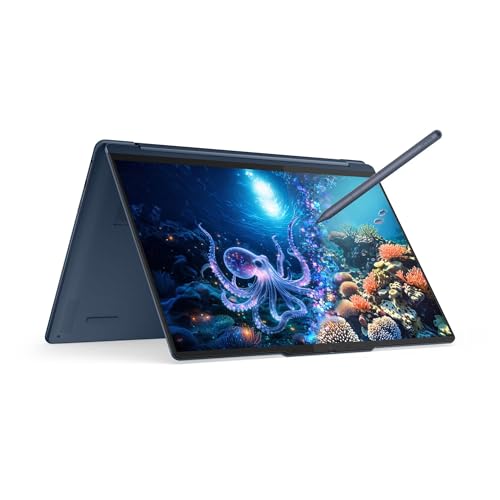
- UNOPENED RETAIL PACKAGING, sold as configured by Lenovo. Includes one year of Courier or Carry-in Lenovo Warranty. Add up to 4 years Lenovo Premium Care Onsite Plus when you register your computer with Lenovo.
- Powered by the high performing Intel Core Ultra 7 258V processor, the Yoga 9i 2-in-1 laptop is ready to take on any challenge, big or small. It unlocks maximum performance and creative efficiency, it has plenty of memory with 32 GB and even more storage with 1 TB.
- The 14″ 2.8K OLED touchscreen display brings sharp clarity and bold colors, with 100% P3 for spot-on color accuracy. The adaptive refresh rate (30Hz-120Hz) adapts to your flow, and with up to 1,100 nits of brightness, even sunlight won’t dull your screen.
Pros
- Premium build that suits frequent touch use
- Versatile 360° hinge for laptop/tent/tablet modes
- Great balance of portability and screen size
Cons
- 14″ may feel small for heavy drawing
- The premium tier can be overkill for basic tasks
Trade-offs / Who should skip (failure cases): Skip if you never use tablet/tent mode—then you’ll likely prefer a simpler clamshell laptop. Also skip if you want a huge canvas for sketching.
Scores: Performance 4.5/5 • Brightness (nits) 5/5 • Ease of Use 4/5 • Value 3.5/5
Microsoft Surface Pro (11th Edition, OLED) — Best touchscreen for tablet-first users
If you want the most “real tablet” experience but still need Windows and occasional laptop mode, this is the one.

- [This is a Copilot+ PC] — A new AI era begins. Experience enhanced performance and AI capabilities with Copilot+ PC, boosting productivity with security and privacy in mind.
- [13" OLED Touch Screen Display] — Cinematic display on-the-go. 1M:1 contrast ratio delivers a wider range of colors.
- [All day battery life] — 14 hours of battery life[5], fast charging with 65W PSU via Surface Connect or USB-C.
Pros
- Best tablet feel and pen workflow in Windows land
- Great for note-taking, PDFs, reading, and markup
- Packs easily for school and travel
Cons
- Lap typing is less stable than a normal laptop
- Keyboard/pen bundles vary—verify what’s included
Trade-offs / Who should skip (failure cases): If you type long sessions on your lap (commuting, lecture halls), a 360° 2-in-1 is usually more comfortable.
Scores: Performance 4/5 • Brightness (nits) 4.5/5 • Ease of Use 4/5 • Value 3.5/5
Samsung Galaxy Book5 Pro 360 (16″) — Best big-screen touchscreen laptop
This is for people who want to touch on a larger canvas—better for split-screen notes, diagrams, and media.
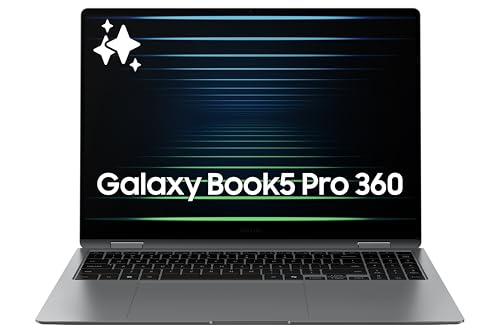
- AI BRINGS THE POWER. YOU BRING THE CREATIVITY: Smoothly juggle tasks with a powerful AI chipset that keeps your creativity flowing
- FAST SEARCH RESULTS, RIGHT AT YOUR FINGERTIPS: Move from “What’s that?” to “Got it” in a snap – AI Select finds answers on your screen fast
- PREMIUM. PORTABLE. PRO. Get the power you need to realize your ambitions in a sleek, lightweight body. Pick it up, pack it up and unleash greatness on the go
Pros
- 16″ screen is easier for multitasking and pen notes
- 2-in-1 flexibility is great for couch/bed use
- Strong “one device for work + entertainment” vibe
Cons
- A bigger footprint is less backpack-friendly
- 16″ can feel awkward in full tablet mode
Trade-offs / Who should skip (failure cases): If portability is your top priority, stick with 13–14″ options.
Scores: Performance 4/5 • Brightness (nits) 4/5 • Ease of Use 4.5/5 • Value 4/5
ASUS ProArt PX13 — Best touchscreen laptop for creators
This is my pick if you’ll use touch for creative tasks (zoom/pan, timeline scrubbing, pen markup) and you want a creator-leaning machine.
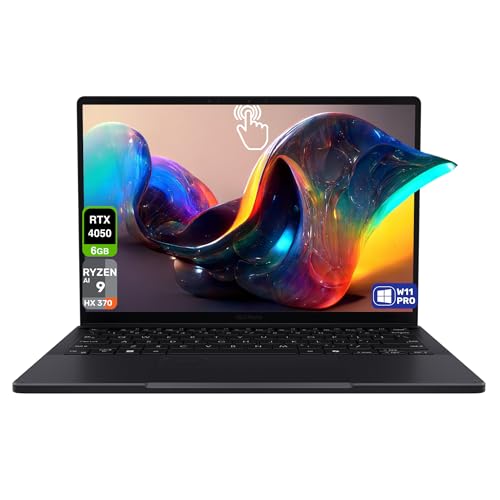
- 【Instant Gratification】Meet ProArt PX13—your go-to 13.3-inch convertible laptop, designed to effortlessly switch between laptop, tent, tablet forms, ready to fuel creative passion whenever inspiration strikes. NVIDIA Studio-validated with GeForce RTX 4050 Laptop GPU and AMD Ryzen AI 9 HX 370 processor (up to 50 TOPS NPU) supercharge all creative endeavors. Military-grade toughness, long-lasting battery transforms any setting into your studio.
- 【Processor & Operating System】Powered by AMD Ryzen AI 9 HX 370 processor with up to 50 TOPS NPU for AI-enhanced features, Windows 11 Pro Copilot+ PC. ASUS DialPad provides intuitive fingertip control over parameters in creative, productivity, media apps. Optimized for versatile performance in professional, school, home environments with quiet reliability and Copilot AI assistance.
- 【Display】13.3-inch 3K (2880x1800) OLED Lumina touchscreen, 16:10 ratio, 500 nits peak brightness, 60Hz panel with precise color accuracy for flawless proofing. Glossy finish for vivid colors, deep blacks; Pantone validated, Dolby Vision support; touch-enabled, folds fully; includes G-Sync per docs, auto-dimming; burn-in warning—auto-hide taskbar advised.
Pros
- Touch is genuinely useful for creative workflows
- Strong fit for editing + markup + light sketching
- Portable “creator” style option
Cons
- 13″ can feel tight for long timeline work
- Overkill for basic browsing and writing
Trade-offs / Who should skip (failure cases): If you only need Office/Google docs and streaming, a value 2-in-1 is the smarter buy.
Scores: Performance 4.5/5 • Brightness (nits) 3.5/5 • Ease of Use 4/5 • Value 3.5/5
Lenovo Yoga 7 2-in-1 (14″) — Best value touchscreen laptop
If you want a modern touchscreen laptop you’ll actually flip into tablet/tent mode—without paying flagship prices—this is the value pick.
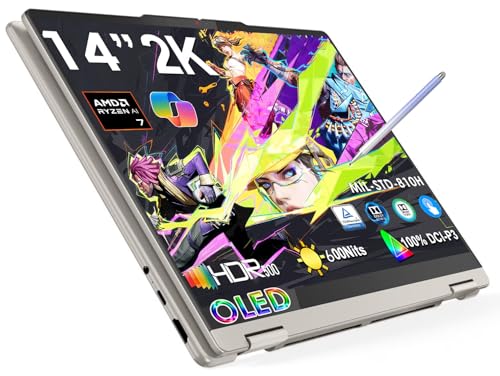
- 🤖 Copilot+ AI Supercharged: Exclusive Recall (preview) & Click to Do (preview) features + AMD Ryzen AI 7 350 (50 TOPS NPU) – private on-device AI for productivity and creative workflows.
- 🌟 600-Nit OLED Visuals: 14" PureSight OLED (1920x1200 WUXGA) with 100% DCI-P3, Dolby Vision, TÜV Low Blue Light – pro color accuracy and eye comfort.
- ⚡ All-Day Creator Mobility: 13.5 hours video playback + Rapid Charge Express (3hrs use/15min charge) – weighs only 3.08 lbs for on-the-go work.
Pros
- Great everyday 14″ size for school/work/travel
- 2-in-1 flexibility without premium pricing vibes
- Strong first touchscreen laptop choice
Cons
- Not as “luxury” as top-tier 2-in-1s
- Configs vary—double-check screen/resolution on the listing
Trade-offs / Who should skip (failure cases): If you’re a serious pen artist, you may want a larger screen or a detachable tablet-first device.
Scores: Performance 4/5 • Brightness (nits) 4/5 • Ease of Use 4.5/5 • Value 4.5/5
Quick compare (no table)
- Best overall: Lenovo Yoga 9i 2-in-1 (14″)
- Best tablet-first: Surface Pro (11th Edition, OLED)
- Best big screen: Galaxy Book5 Pro 360 (16″)
- Best for creators: ASUS ProArt PX13
- Best value: Lenovo Yoga 7 2-in-1 (14″)
Buying guide: how to pick a touchscreen laptop that won’t annoy you
Choose the form factor first
- Clamshell touchscreen: best if you mostly want touch for scrolling/tapping, not full tablet mode.
- 360° 2-in-1: best if you’ll use the tent/tablet mode weekly (notes, presentations, reading).
- Detachable: best if you want a true tablet most of the time (handwriting, couch use, portability).
My primary metric: brightness (nits)
Touchscreens are often glossy. That’s great for contrast, but it can turn into reflections fast. More brightness usually means:
- easier reading in daylight
- less “mirror screen” feeling
- fewer times you crank the screen and still squint
Decide your “pen reality.”
If you’ll take handwritten notes:
- confirm active pen support (not just finger touch)
- Confirm whether the pen/keyboard is included or sold separately (common bundle trap)
Pick a size based on your most common use
- 13–14″: easiest to carry, best “everyday” size
- 15–16″: best for multitasking and creative canvas, heavier and clunkier in tablet mode
Common touchscreen disappointment cases
- You type on your lap constantly: detachables can feel wobbly
- You want a drawing tablet: 13–14″ can feel cramped
- You hate glare: dim displays + glossy touch can be a bad combo
FAQs
Are touchscreen laptops worth it?
Yes, if you’ll actually tap/scroll, annotate PDFs, take notes, present in tent mode, or use a pen. If you never touch the screen, I’d rather put your budget into a better non-touch display or battery.
What’s better: 2-in-1 or detachable?
A 2-in-1 is better for “mostly laptop, sometimes tablet.” A detachable is better for “mostly tablet, sometimes laptop.”
Do I need OLED for a good touchscreen laptop?
No. OLED can look amazing, but the bigger “must-have” for touchscreen comfort is usually enough brightness for your lighting.
Which pick is the safest for most people?
If you want premium: Yoga 9i. If you want value: Yoga 7. If you want tablet-first notes: Surface Pro.
As an Amazon Associate, I earn from qualifying purchases.