
Best Laser Printer for Home Use
As an Amazon Associate I earn from qualifying purchases. Some links may earn us a commission at no extra cost to you.
Laser printers beat inkjets for home use in almost every way — faster printing, lower cost per page, no dried-out cartridges, and sharper text. The right home laser handles documents, schoolwork, and occasional photos without the maintenance headaches of inkjet.
Top picks
Brother HL-L2350DW Mono Laser — Best overall mono
Brother’s HL-L2350DW prints crisp black text at 32 pages per minute with automatic two-sided printing. WiFi and USB connectivity cover all scenarios, and the starter toner prints 700 pages with high-yield replacements hitting 2,600. Most reliable home laser you can buy.
Why it wins: Fastest mono printing with the lowest cost per page and Brother’s legendary reliability.
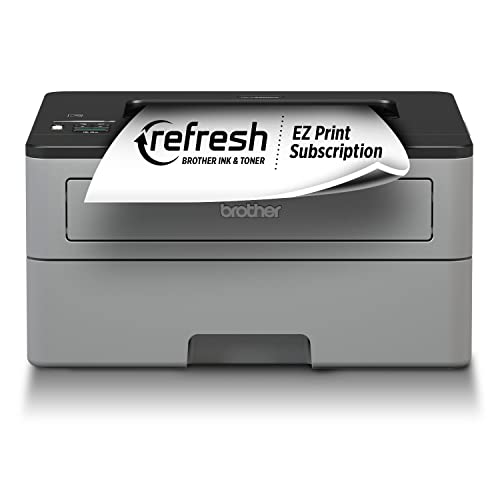
- Fast print speeds up to 32ppm (Based on one-sided printing. Change from default setting required.)
- Print wirelessly from mobile devices (Requires connection to a wireless network)
- Automatic duplex (2-sided) printing
Pros
- 32 pages per minute
- Auto duplex printing
- WiFi and USB connectivity
Cons
- Mono only — no color
- Starter toner is low yield
Social proof: See reviews on Amazon
Trade-offs / who should skip: Those needing color should look at the Brother color model. If you print rarely, an inkjet may be cheaper upfront.
Scores: Speed 5/5 | Cost Per Page 5/5 | Reliability 5/5 | Color 0/5
HP LaserJet M140we Mono Laser — Best compact
HP’s smallest laser printer fits on a bookshelf. It prints, scans, and copies — three functions in a device smaller than most printers. HP+ smart printing and 6 months of free Instant Ink toner make setup painless.
Why it wins: Smallest all-in-one laser printer with scan and copy functionality in a bookshelf-sized package.

- Sold as 1 Each.
- One of the smallest multifunction lasers in its class designed for efficient performance.. Eliminate...
- Easily handle tasks and get a lot from one device—print, scan, and copy.. Take a photo as a copy...
Pros
- Incredibly compact design
- Print, scan, and copy
- 6 months free HP+ toner
Cons
- Requires HP+ account
- Slower than Brother
Social proof: See reviews on Amazon
Trade-offs / who should skip: Those wanting fastest printing should pick Brother. Privacy-conscious users may dislike HP+ requirements.
Scores: Compact Size 5/5 | All-in-One 5/5 | Value 4/5 | Speed 3/5
Brother HL-L3280CDW Color Laser — Best color laser
Brother’s color laser prints sharp text and vibrant graphics at 26 pages per minute. Automatic duplex saves paper, and the 250-sheet tray handles big print jobs. Individual color toner cartridges mean you only replace the color that runs out.
Why it wins: Best color quality at this price with individual toner cartridges and auto duplex.
No products found.
Pros
- Vibrant color output
- Individual toner cartridges
- 26 ppm print speed
Cons
- Higher upfront cost than mono
- Color toner is expensive to replace
Social proof: No products found.
Trade-offs / who should skip: Those who rarely print color should save with a mono laser. High-volume color printing may still be cheaper at a print shop.
Scores: Color Quality 5/5 | Speed 4/5 | Cost Efficiency 4/5 | Value 4/5
HP LaserJet Pro MFP 3101fdwe — Best home office
HP’s Pro MFP handles home office demands with print, scan, copy, and fax. The 35 ppm speed keeps up with heavy document loads, and the auto document feeder handles multi-page scans without babysitting. Best for those who print frequently.
Why it wins: Most complete home office solution with fax, ADF, and fastest print speed.

- Exclusive HP+ model works only with Original HP Cartridges, internet connection and HP account.
- BEST FOR SMALL TEAMS – Print, scan, copy and fax professional-quality black & white documents and...
- FAST AND EFFORTLESS – Fast print speeds, auto paper jam recovery and self-healing Wi-FiTM...
Pros
- 35 ppm print speed
- Print, scan, copy, and fax
- Auto document feeder
Cons
- Larger footprint
- HP+ subscription model
Social proof: See reviews on Amazon
Trade-offs / who should skip: Casual home users don’t need fax or ADF — save with a simpler model. Those printing rarely should consider inkjet for lower upfront cost.
Scores: Home Office 5/5 | Speed 5/5 | Features 5/5 | Size 2/5
Brother MFC-L2820DW Mono All-in-One — Best value all-in-one
Brother’s MFC-L2820DW packs print, scan, copy, and fax into an affordable mono laser. The 34 ppm speed handles documents quickly, auto duplex saves paper, and the 50-page ADF handles multi-page jobs. Best overall value for a feature-complete laser.
Why it wins: Most features per dollar with print, scan, copy, fax, ADF, and duplex in one affordable package.

- BEST FOR SMALL OFFICES – Combining space-saving efficiency and premium monochrome (black & white...
- EFFICIENT PRINTING & SCANNING – Produces black & white documents quickly with print speeds up to...
- FLEXIBLE CONNECTION OPTIONS – Securely connect to multiple devices with built-in dual-band...

Pros
- 34 ppm with auto duplex
- 50-page auto document feeder
- Print, scan, copy, and fax
Cons
- Mono only
- Larger than single-function printers
Social proof: See reviews on Amazon
Trade-offs / who should skip: Those needing color should pick Brother’s color model. If you only print, a simpler HL model saves money.
Scores: Value 5/5 | Features 5/5 | Speed 5/5 | Compact 3/5
As an Amazon Associate, I earn from qualifying purchases.