
Best eReaders Today (and which one you should buy)
As an Amazon Associate I earn from qualifying purchases. Some links may earn us a commission at no extra cost to you.
Choosing an eReader is mostly about three things: how the screen looks (black-and-white vs color, brightness, and glare), how comfortable it is to hold for hours, and which “ecosystem” you live in (Kindle vs Kobo vs everything else). Waterproofing, battery life, note-taking, and library borrowing are the other big deciders.
Top picks
Kindle Paperwhite (11th gen) — Best for most people
If you just want one eReader that does almost everything right, get the Kindle Paperwhite. Its 6.8-inch 300 ppi display is sharp, the warm front light is easy on the eyes, and the IPX8 waterproofing makes it happy at the pool or in the bath.
Why it wins: It’s the best mix of comfort, durability, and Kindle features without getting into “fancy but expensive” territory.

- Kindle Paperwhite – Now with a 6.8” display and thinner borders, adjustable warm light, up to 10 weeks of battery life, and 20% faster page turns.
- Purpose-built for reading – With a flush-front design and 300 ppi glare-free display that reads like real paper, even in bright sunlight.
- More books in more places – Store thousands of titles, then take them all with you. A single charge via USB-C last weeks, not hours.
Pros
-
6.8″ 300 ppi screen is crisp and glare-free
-
Adjustable warm light for night reading
-
IPX8 waterproof for pool, tub, and beach use
-
Battery measured in weeks, not hours
Cons
-
No physical page-turn buttons
-
Not ideal for heavy handwritten notes
-
Slightly heavier than tiny 6″ readers
Social proof
Expert and owner reviews consistently praise the Paperwhite’s readable screen, uniform front light, and long battery life; many call it the “default” Kindle to buy unless you specifically need color or note-taking. See rating & reviews on Amazon for the latest feedback.
Trade-offs / Who should skip
-
Skip it if you mostly read comics, manga, or heavily illustrated books — a color device will be more fun.
-
If you want a very pocketable, ultra-light device, the 6″ basic Kindle or Kobo Clara Colour might feel nicer in hand.
-
For serious handwritten notes in PDFs or textbooks, the Kindle Scribe is much better.
Scores: Performance 4.5/5 · Screen & Lighting 5/5 · Ease of Use 4.5/5 · Value 4.5/5
Amazon Kindle Colorsoft Signature Edition — Best for comics & color Kindle books
Kindle Colorsoft Signature Edition is basically a Paperwhite that learned how to do color: 7″ Colorsoft display, 300 ppi for black-and-white text and 150 ppi for color, with an auto-adjusting front light and wireless charging.
Why it wins: If you live in the Kindle ecosystem and read comics, graphic novels, cookbooks, or textbooks, Colorsoft makes them actually look like they were meant to.
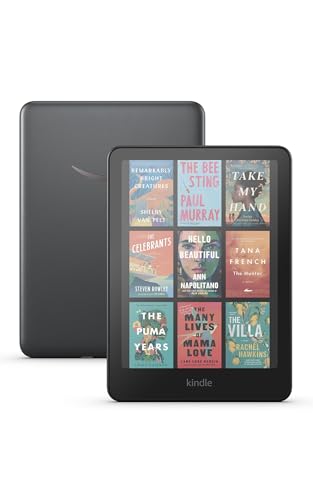
- Read in color – The new 7" Colorsoft display is high-contrast and easy on the eyes, with paper-like color that brings covers and content to life.
- Color your pages – Highlight your favorite scenes in yellow, orange, blue, and pink.
- Marathon reading – A single charge via USB-C lasts up to 8 weeks, or power up with the wireless charging dock (sold separately).

Pros
-
7″ color E Ink with 300 ppi text, 150 ppi color
-
Auto-adjusting front light plus warm-light option
-
IPX8 waterproof and supports wireless charging
-
Great for comics, covers, and color highlights
Cons
-
Text isn’t quite as contrasty as Paperwhite
-
Color adds complexity; pure text readers may not need it
-
Battery life a bit shorter than Paperwhite
Social proof
Early reviewers and long-term testers highlight how much better comic art and book covers look versus monochrome Kindles, and note that the lighting makes color E Ink feel brighter than many rival devices. See rating & reviews on Amazon for up-to-date impressions.
Trade-offs / Who should skip
-
If you only read plain novels, a Paperwhite is simpler and has longer battery life.
-
Serious note-takers will still want a Scribe or Kobo Elipsa-class device.
-
Kobo’s Libra/Clara Colour line may offer better EPUB handling and library support if you prefer to avoid Amazon.
Scores: Performance 4.5/5 · Screen & Lighting 4/5 · Ease of Use 4/5 · Value 3.5/5
Kobo Libra Colour — Best for library borrowing & comfy color reading
Kobo’s Libra Colour is a 7″ color eReader with Kaleido 3 E Ink, physical page-turn buttons, IPX8 waterproofing, and 32 GB of storage. It also hooks directly into the Kobo Store and many public libraries via OverDrive, so you can borrow books over Wi-Fi on the device.
Why it wins: It’s the most comfortable all-round color reader if you want to mix purchased books, sideloaded EPUBs, and public-library borrowing.

- 𝗕𝗥𝗢𝗪𝗦𝗘 𝗔𝗡𝗗 𝗥𝗘𝗔𝗗 𝗘𝗕𝗢𝗢𝗞𝗦 𝗜𝗡 𝗙𝗨𝗟𝗟 𝗖𝗢𝗟𝗢𝗨𝗥 - Book covers, comics, graphic novels, illustrations, note-taking and more come to life. No glare in sunlight, no notifications – just you and your eBooks in full-color
- 𝗬𝗢𝗨𝗥 𝗝𝗢𝗨𝗥𝗡𝗔𝗟, 𝗗𝗔𝗜𝗟𝗬 𝗣𝗟𝗔𝗡𝗡𝗘𝗥, 𝗔𝗡𝗗 𝗠𝗢𝗥𝗘 - Dive into your stories with colorful markups. With Kobo Stylus 2* compatibility (*sold separately), annotate, highlight, and note take your eBooks in color
- 𝗟𝗜𝗚𝗛𝗧𝗪𝗘𝗜𝗚𝗛𝗧 𝗘𝗥𝗚𝗢𝗡𝗢𝗠𝗜𝗖 𝗗𝗘𝗦𝗜𝗚𝗡 - Ergonomically designed with page-turn buttons, left/right screen rotation, full font size and margin customization, and landscape mode
Pros
-
7″ Kaleido 3 display handles text and color well
-
Ergonomic “handle” side with page-turn buttons
-
IPX8 waterproof and eco-conscious materials
-
Native OverDrive support for many public libraries
Cons
-
Color E Ink still less punchy than an LCD tablet
-
Interface favors EPUB/Kobo store, not Kindle books
-
Note-taking requires a separate Kobo Stylus 2
Social proof
Many independent tests rate Libra Colour as one of the best-value color eReaders, often beating Colorsoft on price while matching or exceeding it on features like physical buttons and library integration. See reviews on Amazon for hands-on owner impressions.
Trade-offs / Who should skip
-
If you are deeply locked into Kindle purchases, switching ecosystems may be more hassle than it’s worth.
-
The slightly muted color is fine for comics and cookbooks, but artists and graphic-design folks might still prefer an iPad-style LCD.
-
For a smaller, lighter color Kobo, the Clara Colour is better for one-handed reading.
Scores: Performance 4.5/5 · Screen & Lighting 4/5 · Ease of Use 4.5/5 · Value 4.5/5
Kindle Scribe (16 GB) — Best for note-taking, PDFs, and textbooks
Kindle Scribe is a 10.2″ 300 ppi e-ink tablet that’s both a Kindle and a digital notebook. It ships with a pen, lets you mark up PDFs, write directly in book margins via newer note features, and offers notebook tools that make long handwritten notes easier to manage.
Why it wins: If you want an eReader that can replace a paper notebook for school, work, or journaling, this is the one to beat in the Kindle world.

- Amazon Kindle Scribe (16 GB) the first Kindle and digital notebook, all in one, with a 10.2” 300 ppi Paperwhite display, includes Basic Pen
- EXPLORE KINDLE NOTEBOOKS – A digital notebook you can write on. Journal, sketch, take notes, and more.
- CONVERT HANDWRITTEN NOTES TO TEXT – View or share your notes with contacts and browse notes on the go through the Kindle app.
Pros
-
Large 10.2″ 300 ppi display great for PDFs and layouts
-
Pen included; no charging or pairing needed
-
Margin notes and notebooks for serious annotation
-
Battery lasts months of reading, weeks of writing
Cons
-
Bigger and heavier than a “just reading” eReader
-
No color; diagrams and highlights stay monochrome
-
Handwriting tools are good, but not full iPad-style apps
Social proof
Reviewers generally love the Scribe as a distraction-free notebook with a sharp screen; many say it’s especially good for students, researchers, and people who like annotating books directly. Some note that other e-ink tablets offer more flexible apps, but with more complexity. See rating & reviews on Amazon for current user experiences.
Trade-offs / Who should skip
-
If you just want a light novel reader, the size will feel overkill; get a Paperwhite or Kobo Clara instead.
-
If your workflow needs Google Drive, full OneNote, or Android apps, consider a more tablet-like e-ink device — just know those are more complex than simple eReaders.
Scores: Performance 4/5 · Screen & Lighting 4.5/5 · Ease of Use 4/5 · Value 4/5
Kobo Clara Colour — Best compact, travel-friendly color eReader
The Kobo Clara Colour shrinks color E Ink into a 6″, super-handy device with Kaleido 3, 300 ppi for text, 150 ppi for color, 16 GB storage, waterproofing, and excellent battery life.
Why it wins: If you want a smaller, lighter reader that still shows covers, comics, and highlights in color—and you like library borrowing—this is the “just right” option.

- 𝗕𝗥𝗢𝗪𝗦𝗘 𝗔𝗡𝗗 𝗥𝗘𝗔𝗗 𝗘𝗕𝗢𝗢𝗞𝗦 𝗜𝗡 𝗙𝗨𝗟𝗟 𝗖𝗢𝗟𝗢𝗨𝗥 - Read in colour with a 6” E Ink Kaleido 3 display to enjoy eBook covers, comics, graphic novels, illustrations, and more.
- 𝗛𝗜𝗚𝗛𝗟𝗜𝗚𝗛𝗧 𝗜𝗡 𝗖𝗢𝗟𝗢𝗨𝗥 - With multiple colours available at the touch of a finger, you can highlight your eBooks. Add, erase, or change colours as you go, and easily see all your highlights by chapter at a glance.
- 𝗘𝗔𝗦𝗬 𝗢𝗡 𝗬𝗢𝗨𝗥 𝗘𝗬𝗘𝗦 - ComfortLight PRO automatically reduces blue light and personalize your reading settings via font size, line spacing, or even Dark Mode
Pros
-
Pocketable 6″ Kaleido 3 display with 300 ppi text
-
Waterproof design for reading anywhere
-
Ties into Kobo store and library lending
-
Excellent balance of features vs. size
Cons
-
Smaller screen not ideal for dense PDFs
-
Color less vivid than on LCD tablets
-
No built-in stylus support (reading-first device)
Social proof
Recent reviews call Clara Colour a “Goldilocks” color reader: small, comfy, and more affordable than larger color models while still feeling premium. Owners consistently highlight its light weight, snappy performance, and good battery life. See reviews on Amazon for the newest owner feedback.
Trade-offs / Who should skip
-
If you mostly read big PDFs, textbooks, or sheet music, the 6″ screen will feel cramped; a larger Scribe- or Elipsa-style device is better.
-
If you hate touch-only navigation and want page buttons, pick the Libra Colour.
Scores: Performance 4/5 · Screen & Lighting 4/5 · Ease of Use 4.5/5 · Value 4.5/5
Quick compare
-
Kindle Paperwhite — Best for most people:
Balanced 6.8″ 300 ppi screen, warm front light, IPX8 waterproofing, and huge Kindle library; not great for heavy handwriting. -
Kindle Colorsoft Signature Edition — Best for comics & color Kindle books:
7″ color E Ink and wireless charging; slightly less contrasty text and shorter battery life than Paperwhite. -
Kobo Libra Colour — Best for library borrowing & comfy color reading:
7″ color screen, page-turn buttons, library support, and IPX8 waterproofing; works best if you’re okay living outside the Kindle ecosystem. -
Kindle Scribe (16 GB) — Best for note-taking and PDFs:
10.2″ 300 ppi screen with pen input and notebook features; bigger and heavier, monochrome only. -
Kobo Clara Colour — Best compact travel reader:
6″ color display in a very light body, great for one-handed reading and libraries; small screen isn’t ideal for complex layouts or PDFs.
FAQs
Q: What’s the best eReader if I mostly read at night?
A: Look for a 300 ppi screen, a good front light, and especially the ability to adjust color temperature (cool to warm). Kindle Paperwhite, Colorsoft, Libra Colour, and Clara Colour all let you warm the light up so it’s less harsh in a dark room.
Q: Can I borrow library books on these eReaders?
A:
-
On Kobo (Clara/Libra/etc.), many regions let you log into a library service directly on the device and borrow ebooks over Wi-Fi with a library card.
-
On Kindle, US library lending typically uses Libby/OverDrive to send a compatible title to your Amazon account, which then appears on your Kindle. It’s not as direct as Kobo’s approach, but it works well once you’ve linked accounts.
Q: Is a color eReader better than an iPad for comics?
A: Different strengths. Color E Ink (Colorsoft, Libra/Clara Colour) is way easier on the eyes, glare-free outdoors, and lasts weeks on a charge, but colors are softer and animations are slow. Tablets like an iPad look more vivid and are faster, but they’re heavier, bright, and full of distractions. If reading comfort and battery life matter more than “pop,” color E Ink is nicer; if you want punchy art and animation, a tablet wins.
As an Amazon Associate, I earn from qualifying purchases.