
Best Controllers for Series X Gaming
As an Amazon Associate I earn from qualifying purchases. Some links may earn us a commission at no extra cost to you.
If you play on a Series X, your controller is basically your whole experience in your hands. Comfort, stick reliability (drift…), latency, and extras like paddles or trigger locks matter more than RGB or fancy colors. Below are my top picks that are actually available in the US and work great with Series X right now.
Top picks
Xbox Wireless Gaming Controller (2025, Carbon Black) — Best for most players
A refined, no-nonsense pad that just works perfectly with Series X and the rest of your Xbox ecosystem.
Why it wins: It’s the exact experience games are designed around—great feel, wide compatibility, and zero weirdness.

- XBOX WIRELESS CONTROLLER: Experience the modernized design of the Xbox Wireless Controller, featuring sculpted surfaces and refined geometry for enhanced comfort during gameplay with battery life up to 40 hours*.
- STAY ON TARGET: New hybrid D-pad and textured grip on the triggers, bumpers, and back-case.
- SHARE BUTTON: Seamlessly capture and share content such as screenshots, recordings, and more with the new Share button.
Pros
-
Very comfortable shape for most hand sizes
-
Hybrid D-pad feels crisp for fighters and menus
-
Textured grips help in long, sweaty sessions
-
Works on Xbox, PC, phones, some TVs and devices
Cons
-
Uses AA batteries unless you add a pack
-
No paddles or hair-trigger locks
-
Standard thumbsticks—not drift-resistant tech
Social proof
This is still the “default recommendation” in most Xbox controller guides because it’s reliable, ergonomic, and supported everywhere. See reviews on Amazon for long-term impressions from daily players.
Trade-offs / Who should skip
Perfect if you want something familiar, simple, and first-party, or you just need a second pad that always works. Skip it if you specifically want paddles, hair-trigger locks, or anti-drift sticks—those are where the pro options below pull ahead.
Scores: Performance 4/5 · Responsiveness 4/5 · Ease of Use 5/5 · Value 5/5
Xbox Elite Wireless Controller Series 2 — Best first-party pro controller
Microsoft’s Elite Series 2 is the “treat yourself” controller: paddles, metal parts, hair triggers, and a rechargeable battery.
Why it wins: Deep customization plus premium feel make it a monster for shooters and competitive modes, while still feeling like a normal Xbox pad.

- Sold as 1 Each.
- Xbox Elite Wireless Controller Series 2 for Xbox One, Xbox Series S, Xbox Series X and PC. Tailor the controller to your preferred gaming style with interchangeable thumbstick and paddle shapes. Save up to 3 custom profiles and 1 default profile on the controller and switch between them on the fly with the Profile button. Use Xbox Wireless, Bluetooth or the included USB-C cable to play across your Xbox One and Windows 10 devices.. What's in the box: Xbox Elite Wireless Controller Series 2;
- Swap thumbstick toppers, D-pads, and paddles to tailor your controller to your preferred gaming style. Use Xbox Wireless, Bluetooth, or the included USB-C cable to play across Xbox Series X|S, Xbox One, and Windows.. Safety Data Sheet.

Pros
-
Adjustable-tension thumbsticks for dialed-in aim
-
Four back paddles for extra inputs
-
Hair-trigger locks for faster shots
-
Built-in battery rated for long sessions
Cons
-
Heavier than a stock controller
-
Extra features can overwhelm new players
-
Some users report wear with really heavy use
Social proof
Elite Series 2 almost always ranks near the top in “best Xbox controller” lists thanks to its paddles, tuning options, and solid wireless performance. Amazon reviews are full of players using it as their main ranked-play controller.
Trade-offs / Who should skip
Ideal if you play competitive shooters or just want the nicest-feeling first-party pad. Not ideal if you mostly game casually on weekends or are tough on gear and worried about wearing down a pricier controller.
Scores: Performance 5/5 · Responsiveness 5/5 · Ease of Use 4/5 · Value 4/5
Turtle Beach Victrix Pro BFG Reloaded (Xbox) — Best high-end modular / anti-drift pick
A fully modular controller with Hall-effect sticks and triggers to reduce drift, plus tons of layout flexibility.
Why it wins: For pure tech, flexibility, and long-term reliability, this is arguably the strongest all-round Series X controller you can buy right now.
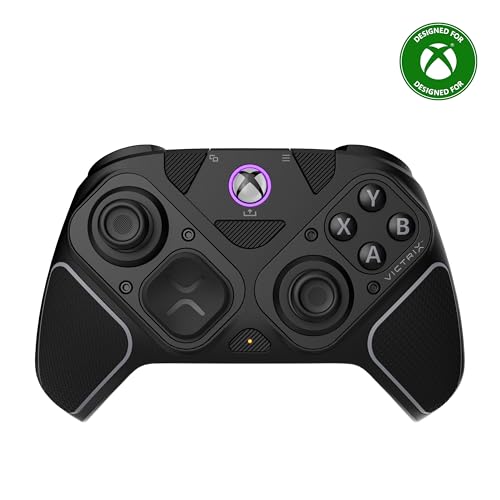
- 3 Customizable Modules with Built-In Hall-Effect Technology
- Ergonomically Enhanced 6-Button Fightpad Module with Kailh Microswitches
- 5-Stop Hall-Effect Clutch Triggers with Hair-Trigger Mode
Pros
-
Hall-effect sticks and triggers resist drift
-
Swappable modules and D-pads for custom layouts
-
Wireless, Bluetooth, and wired modes available
-
Rear buttons and clutch triggers for fine control
Cons
-
Setup and modules can feel fiddly at first
-
Bigger learning curve than a normal pad
-
Premium design that may be overkill for casuals
Social proof
Recent controller guides often put the Victrix Pro BFG line at or near the very top, especially for people who want anti-drift tech and modular layouts. Reviews on Amazon highlight strong performance in shooters and fighters.
Trade-offs / Who should skip
Perfect if you grind shooters or fighters, hate stick drift, and love tuning your gear. Skip it if you’d rather just plug in and play, or you don’t care about swapping modules and profiles.
Scores: Performance 5/5 · Responsiveness 5/5 · Ease of Use 3/5 · Value 4/5
Razer Wolverine V2 Chroma — Best wired esports-style controller
A wired tournament-style pad with clicky mecha-tactile buttons, extra bumpers, and Razer Chroma RGB lighting.
Why it wins: If you don’t care about wireless and just want speed, precision, and extra inputs for sweaty matches, this is a beast.

- POWERED BY RAZER CHROMA RGB — Enjoy Greater Immersion and Customize with 16.8 Million Colors and Lighting Effects via the Razer Controller Setup for Xbox App
- 6 ADDITIONAL REMAPPABLE BUTTONS — Unleash Greater Control and a More Personalized Play Style with 4 Extra Triggers and 2 Remappable Bumpers That Can Be Customized via the Razer Controller Setup for Xbox App
- HAIR TRIGGER MODE WITH TRIGGER STOP-SWITCHES — For a Competitive Edge, Activate Hair Trigger Mode via Two Slide-Locks on the Underside of the Controller That Greatly Reduce Travel Distance to the Main Triggers, Enabling an Ultra-Fast Rate of Fire
Pros
-
Mecha-tactile face buttons feel fast and crisp
-
Extra remappable bumpers and triggers for macros
-
Trigger-stop switches for ultra-short pulls
-
Wired USB removes latency and battery worries
Cons
-
No wireless for couch-distance freedom
-
Fixed cable limits where you can sit
-
Shape slightly bulkier than a standard pad
Social proof
The Wolverine V2 Chroma is frequently recommended as one of the best wired controllers for Xbox and PC thanks to its fast, clicky buttons and extra controls. Reviews often mention it being a go-to for ranked games.
Trade-offs / Who should skip
Grab this if your priority is pure responsiveness and lots of remappable buttons, and you sit relatively close to your console or PC. Skip it if you mainly chill on the couch and really care about being wireless.
Scores: Performance 5/5 · Responsiveness 5/5 · Ease of Use 4/5 · Value 4/5
PowerA Enhanced Wired Controller for Xbox Series X|S — Best budget option
A popular wired pad that mimics the feel of the stock controller, adds back buttons, and stays very affordable.
Why it wins: For the price of a game (or less), you get mappable rear buttons, rumble, and a familiar layout that’s officially licensed.

- Xbox Series X|S controller with superior ergonomics and intuitive button layout
- Two mappable Advanced Gaming Buttons
- Immersive dual rumble motors
Pros
-
Two mappable rear buttons for key actions
-
Dual rumble motors for immersive feedback
-
Long 10 ft USB cable for couch play
-
Officially licensed; layout feels instantly familiar
Cons
-
Wired only—no wireless or Bluetooth
-
Plastic feel not as premium as others
-
No advanced trigger locks or paddles
Social proof
This controller consistently shows up in “best cheap Xbox controller” lists and near the top of Amazon’s category rankings. Reviews highlight it as a solid backup or guest pad with surprisingly nice features for the money.
Trade-offs / Who should skip
Great as a second controller, for younger players, LAN setups, or anyone who wants basic paddles without paying pro-pad prices. Not ideal if you absolutely need wireless or want ultra-premium materials and adjustability.
Scores: Performance 3/5 · Responsiveness 4/5 · Ease of Use 5/5 · Value 5/5
Quick compare
-
Xbox Wireless Gaming Controller — Best for most players: standard feel, wide compatibility; lacks pro extras.
-
Xbox Elite Series 2 — Best for serious multi-genre gamers: paddles, hair triggers, long battery; a bit heavy and complex.
-
Victrix Pro BFG Reloaded (Xbox) — Best for hardcore and anti-drift nerds: modular Hall-effect design; more setup and higher cost.
-
Razer Wolverine V2 Chroma — Best for wired competitive play: super-fast buttons, extra inputs; no wireless at all.
-
PowerA Enhanced Wired — Best budget upgrade: back buttons and rumble for cheap; feels simpler and is wired only.
FAQs
Q: Will my old Xbox One controllers work on Series X?
A: Yes. Official Xbox One controllers and most officially licensed third-party Xbox One pads work on Series X|S. They just won’t magically gain newer features like the dedicated Share button unless you buy the newer controller.
Q: Is the Elite Series 2 or Victrix Pro BFG “better”?
A: It depends. Elite Series 2 gives you first-party polish, excellent paddles, and a built-in battery in a familiar shape. Victrix Pro BFG adds Hall-effect sticks for anti-drift, a wild modular layout, and very strong competitive features, but it’s more complex and more “enthusiast”-focused.
Q: Is a wired controller actually lower latency than wireless on Series X?
A: Both are already very fast, and most people won’t feel a difference. A wired pad just removes wireless interference and battery levels as variables, which is why many tournament-style controllers stick to cables. For normal home use, wireless is usually perfectly fine.
Q: How many controllers do I realistically need?
A: For solo play, one good controller is enough. If you play couch co-op or split-screen, a common setup is: one “hero” pad (Elite, Victrix, or Razer) for you, plus one cheaper wired pad (PowerA) for friends so they’re not wearing out your main controller.
As an Amazon Associate, I earn from qualifying purchases.