
Best Cheap Printers (That Won’t Drive You Nuts)
As an Amazon Associate I earn from qualifying purchases. Some links may earn us a commission at no extra cost to you.
If you’re trying to keep costs down, the trick is matching the right low-cost printer to your use case. For pure text, a basic mono laser is usually cheaper to run; for occasional color handouts, a simple inkjet AIO works; and if ink costs scare you, a small refillable-tank model wins on ownership costs.
How I researched
I compared late-2025 printer tests and deep dives, prioritized page cost and reliability, checked platform quirks (HP+/Instant Ink, driver support, refill ecosystems), and noted which models are still current in the U.S. I weighed text/photo quality, ppm/IPM speeds, duplexing, tank/cartridge availability, and warranty terms from manufacturer sources.
Top picks
Brother HL-L2350DW — Best for cheap, fast text (mono laser)
A no-frills, compact mono laser that’s quick, reliable, and easy to live with.
Why it wins: Fast duplex text, robust driver support, and low fuss at a low entry price.
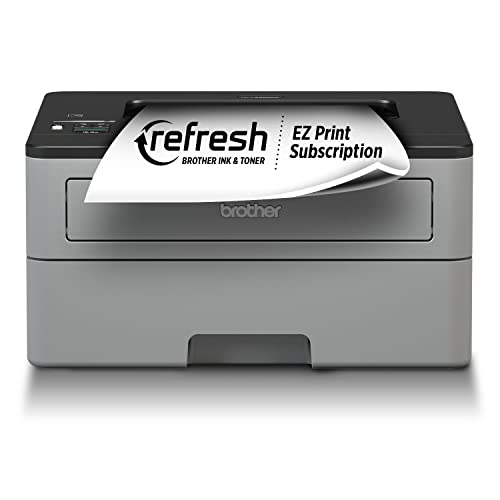
- Print more, wait less. Engineered for increased efficiency with class leading print speeds of up to 32 pages per minute
- Dynamic features accommodate your evolving needs. The 250-sheet paper capacity helps improve efficiency with less refills and handles letter or legal sized paper
- Flexible printing. The manual feed slot offers flexible paper handling for a variety of papers and sizes, such as card stock, envelopes, etc. to help you create professional looking documents
Pros
-
Crisp text; great for forms & drafts
-
Auto duplex saves paper
-
Compact; 250-sheet tray is handy
-
Typically cheaper to run than inkjets
Cons
-
No color—text only
-
No scanner/copier
-
No Ethernet port
Social proof
Commonly praised for reliability and simplicity—see rating & reviews on Amazon.
Trade-offs / Who should skip
Skip if you need color or scanning. Consider a color AIO below instead.
Scores: Performance 4.5/5 · Text speed 4.5/5 · Ease of Use 4/5 · Value 4.5/5
HP DeskJet 2755e — Best super-cheap color all-in-one (home)
Entry-level color printing with scan/copy for homework, forms, and light craft prints.
Why it wins: Very low upfront cost with decent photo quality for the price.

- FROM AMERICA'S MOST TRUSTED PRINTER BRAND – Best for home printing, including basic color documents like recipes, forms and travel documents. Print speeds up to 7.5 pages per minute in black or 5.5 pages per minute in color
- KEY FEATURES – Print, copy and scan in color, plus mobile and wireless printing
- INCLUDES HP+ SMART FEATURES – Upgrade to HP+ during setup to get advanced features for mobile printing, security, automatic updates and more. HP+ only works with an HP account, internet connection and HP Ink for the life of the printer
Pros
-
Color prints look nice for the money
-
Simple app-based setup
-
Scanner is handy for school forms
-
Very compact footprint
Cons
-
Not ideal for heavy printing
-
No borderless 4×6
-
Ink costs add up without a plan
Social proof
Widely purchased budget AIO—see rating & reviews on Amazon.
Trade-offs / Who should skip
Great for light monthly use. If you print a lot of color, jump to EcoTank for lower running costs.
Scores: Performance 3.5/5 · Photo quality 3.5/5 · Ease of Use 4/5 · Value 4/5
Canon PIXMA MG3620 — Best cheap photo-leaning color prints (casual)
A longtime budget favorite for nicer-looking color pages and photo projects.
Why it wins: Canon’s dye inks produce punchy graphics; auto duplex at this price is a plus.

- Wireless 3-in-1 (print | copy | scan)
- Easily print and scan photos and documents directly from your mobile devices.
- 9.9 / 5.7 ipm print speed

Pros
-
Vibrant color and photo output
-
Auto duplex printing
-
Simple Wi-Fi setup
-
Compact all-in-one
Cons
-
Slower color pages
-
No ADF for multi-page scans
-
Cartridge yields are modest
Social proof
Popular low-cost Canon—see rating & reviews on Amazon.
Trade-offs / Who should skip
If you print lots of color pages monthly, EcoTank will be cheaper to run long-term.
Scores: Performance 3.5/5 · Photo quality 4/5 · Ease of Use 3.5/5 · Value 4/5
HP LaserJet M110w — Best ultra-small laser (dorms/apartments)
The “it fits anywhere” mono laser for tight spaces and quick text jobs.
Why it wins: It’s one of HP’s smallest lasers with quick text output and wireless printing.

- FROM AMERICA'S MOST TRUSTED PRINTER BRAND – Perfect for small teams printing professional-quality black & white documents and reports. Perfect for 1-3 people
- WORLD'S SMALLEST LASER IN ITS CLASS – Precision laser printing that fits anywhere
- FAST PRINT SPEEDS – Up to 21 black-and-white pages per minute single-sided
Pros
-
Very compact, light, simple
-
Clean, sharp B/W text
-
Quick first page for short jobs
-
Easy wireless setup
Cons
-
No duplex printing
-
No scanner/copier
-
Small starter toner
Social proof
Praise centers on tiny size and easy setup—see rating & reviews on Amazon.
Trade-offs / Who should skip
If you need duplex or bigger trays, the Brother HL-L2350DW is better.
Scores: Performance 4/5 · Text speed 4/5 · Ease of Use 4.5/5 · Value 4/5
Epson EcoTank ET-2800 — Best cheapest-to-run color (refillable tank)
Skip cartridges entirely; pay more upfront, far less per page over time.
Why it wins: Cartridge-free tanks drastically cut running costs for regular color printing.

- Innovative Cartridge-Free Printing ― High-capacity ink tanks mean no more tiny, expensive ink cartridges; Epson’s exclusive EcoFit ink bottles make filling easy and worry-free.Operating Temperature : 50 to 95 °F (10 to 35 °C)
- Dramatic Savings on Replacement Ink ― Save up to 90% with replacement ink bottles vs. ink cartridges (1) – that’s enough to print up to 4,500 pages black/7,500 color (2), equivalent to about 90 individual ink cartridges (3)
- Stress-Free Printing — Up to 2 years of ink in the box (4) – and with every replacement ink set – for fewer out of ink frustrations
Pros
-
Extremely low cost per page
-
Ink bottles last a long time
-
Good everyday color quality
-
Simple flatbed scanner
Cons
-
Higher upfront cost
-
Slower than office-class models
-
No ADF for stacks
Social proof
Well-liked for saving money on ink—see rating & reviews on Amazon.
Trade-offs / Who should skip
Worth it if you print monthly in color; overkill for rare printing—get a cheap laser instead.
Scores: Performance 3.5/5 · Ink economy 5/5 · Ease of Use 4/5 · Value 4.5/5
Quick compare
-
Brother HL-L2350DW — Best for cheap text: Fast duplex mono; no scanner.
-
HP DeskJet 2755e — Best super-cheap AIO: Color + scan/copy; ink can add up.
-
Canon PIXMA MG3620 — Best casual photos: Nicer color; slower; no ADF.
-
HP LaserJet M110w — Best ultra-small laser: Tiny and quick; no duplex.
-
Epson EcoTank ET-2800 — Best low running cost: Refillable tanks; slower but super cheap per page.
Buying guide
Start with what you print most.
-
Mostly text? A mono laser is cheapest and least fussy (Brother HL-L2350DW).
-
Occasional color? A budget inkjet AIO is fine (HP 2755e, Canon MG3620). Expect higher ink costs unless you use a subscription or print lightly.
-
Lots of color pages/photos? A refillable tank like EcoTank ET-2800 slashes page cost.
Must-have features on a budget
-
Auto duplex: Saves paper (Brother HL-L2350DW, Canon MG3620).
-
Scanner/ADF: If you frequently scan multi-page docs, pick an AIO with an ADF (none of the ultra-cheap picks include one—consider stepping up within Brother/Canon lines).
-
Warranty & support: HP 2755e commonly offers 1-year standard (2 years with HP+ activation); Brother HL series typically 1-year limited; Epson ET-2800 often includes a 2-year limited with registration. Verify details at setup.
Hidden costs to watch
-
Cartridge yield & subscription terms: Budget inkjets can get expensive per page—subscription plans help if your monthly volume fits.
-
Starter toner/ink: Entry models often ship with low-yield starters; plan your first refill accordingly.
-
Platform locks: HP+ requires cloud activation and ties supplies/service; make sure you’re comfortable with that before enabling.
FAQs
Q: Laser or inkjet—what’s cheaper?
A: For mostly text, a basic mono laser tends to be cheaper and more reliable over time. For color, refillable-tank inkjets (EcoTank/MegaTank/Smart Tank) offer the lowest running cost if you print regularly.
Q: Do I need HP+ on the 2755e?
A: No, but activating HP+ can extend the warranty to 2 years. Read the on-box terms during setup to decide.
Q: Can these print double-sided automatically?
A: HL-L2350DW and MG3620 support auto duplex; M110w and ET-2800 do not.
As an Amazon Associate, I earn from qualifying purchases.