
Best budget 3D printer
As an Amazon Associate I earn from qualifying purchases. Some links may earn us a commission at no extra cost to you.
Budget 3D printers have gotten way easier lately—but the “best” one still depends on what you’re printing (big parts vs. mini parts), how much tinkering you’ll tolerate, and whether you need an enclosure. My main scoring metric here is usable build volume (XYZ in mm) because it’s the quickest way to avoid buyer’s remorse when you realize your projects don’t fit.
How I researched
I compared the most recent 6–12 month “best budget 3D printer” roundups and deep-dive reviews, cross-checked maker spec sheets/manuals for build volume + speed claims, noted variant/availability quirks (especially with “Pro/Plus/Max” names), and weighed performance against durability/ownership costs (replacement nozzles, bed surfaces, and how much tuning is typically required).
Top picks
Creality Ender-3 V3 SE — Best for first-time buyers who want “simple, not perfect”
A beginner-friendly budget pick with auto bed leveling + direct drive, and a very standard-size build area that fits most starter projects. Tom’s Hardware calls it a beginner’s dream and lists a 220×220×250 mm build volume.
Why it wins: solid feature mix (auto leveling + direct drive) without jumping into higher-price “prosumer” territory.
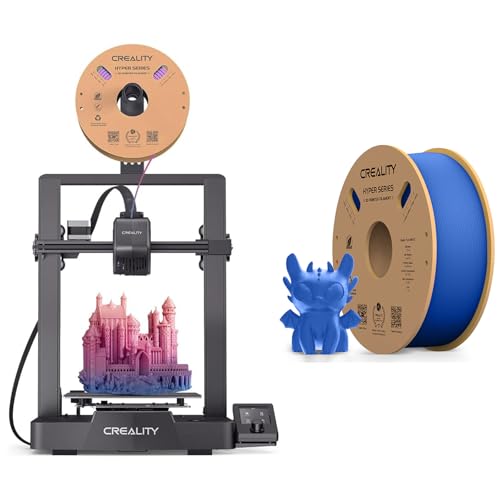
- 【250MM/S HIGH PRINT SPEED】The Creality Ender-3 V3 SE 3d printers for home use desktop boasts a maximum print speed of 250mm/s, allowing it to complete prints significantly faster than many other budget 3D printers. This rapid printing capability reduces overall print time, making it an efficient choice for users seeking quick results. Whether you're working on large projects or producing multiple items, the Ender-3 V3 SE's high print speed enhances productivity and turnaround times, making it a
- 【CR-TOUCH SENSOR AUTO-LEVELING】Creality Ender 3 V3 SE 3d printer is equipped with an auto-leveling feature, which is a significant advantage for 3D printing. This feature ensures precise bed calibration by automatically adjusting the print bed to the correct level before each print job.
- 【DIRECT DRIVE EXTRUDER】Direct Drive Extruders of Creality ender 3 v3 SE 3d printers offer precise filament control close to the hotend, improving print quality and reducing extrusion issues. They support various filaments without Bowden tubes, minimizing jams. Stringing and oozing are reduced, leading to cleaner prints. Accurate retraction control prevents filament leakage. Small details are printed with precision, and support materials are handled efficiently. Flexible filaments like TPU are pr
Pros
-
Standard 220×220×250 mm build volume fits most prints
-
Direct drive helps with TPU and retraction control
-
Auto leveling listed in the spec table
-
Fast for the price (Tom’s cites up to 250 mm/s; “normal” around 150 mm/s)
Cons
-
No Wi-Fi; file transfer is SD card
-
Not enclosed (drafts + ABS are harder)
Trade-offs / Who should skip
-
Skip if you need Wi-Fi or remote management—this one stays old-school with SD.
-
Failure case: if your room has drafts or you plan ABS/ASA often, an open-frame printer can warp prints—consider an enclosed pick below.
Scores: Performance 4/5 • Build Volume 4/5 • Ease of Use 4/5 • Value 5/5
Social proof: See reviews on Amazon.
Anycubic Kobra 2 Neo — Best for “faster prints” on a tight budget
Anycubic positions the Kobra 2 Neo as a high-speed entry model with LeviQ 2.0 auto leveling and a 250×220×220 mm stated print area.
Why it wins: strong speed-on-a-budget specs without shrinking the bed.

- 【5X High-Speed】More than 65% shorter time when printing the same model. The Maximum Print Speed is 250mm/s. Recommended print speed is 150mm/s ensures a perfect blend of precision and performance, empowering you to bring your ideas to life with unparalleled speed and accuracy.
- 【New Integrated Extruder】The newly upgraded extrusion system and cooling system melt filaments quickly through the 60W hot end. At the same time, it is equipped with a 7000 rpm cooling fan to ensure rapid cooling and molding of the model.
- 【Details Even Better】Apply the linear propulsion and input shaping functions in Marlin firmware to reduce spillage and print resonance, improve print quality and stability, and create smoother and clearer model details. Novices can also produce high-quality works for their first print.
Pros
-
Stated print size 250×220×220 mm (extra height vs. many 220 mm beds)
-
Maker lists 250 mm/s max and 150 mm/s typical
-
LeviQ 2.0 auto leveling + Z-offset compensation
-
Direct extruder listed in specs
Cons
-
“High-speed” still needs tuning for best quality
-
Filament runout sensor is listed as optional
Trade-offs / Who should skip
-
Skip if you want a huge community + profiles for one exact model—Anycubic variants change quickly, so double-check you’re buying the exact “Kobra 2 Neo.”
-
Failure case: if you push speed without calibrating, small parts and overhangs can look rough—slow down for detail prints.
Scores: Performance 4/5 • Build Volume 4/5 • Ease of Use 4/5 • Value 5/5
Social proof: See reviews on Amazon.
ELEGOO Neptune 4 Pro — Best for a bit more build volume + “quiet” focus
Elegoo markets the Neptune 4 Pro as a quieter machine (they claim <50 dB) with a 225×225×265 mm build volume, and Tom’s Hardware’s review highlights its speed/quality for the class.
Why it wins: slightly larger build volume than the usual 220×220×250, plus a feature set you can grow into.

- 500MM/S LIGHTNING-FAST SPEED: Neptune 4 Plus is equipped with powerful Klipper firmware, enable impressive printing speeds of up to 500mm/s (default 250mm/s) and up to 12000mm/s accelerations. Rapid filament is recommended for high speed mode
- BIGGER BUILD VOLUME: 12.59”x12.59”x15.15”/320x320x385mm larger build volume, Neptune 4 Plus help you create larger models or multiple smaller objects in a single print, expanding your creative possibilities
- PRECISE & EXCELLENT PRINTING: Support input shaping and pressure advancing, and acceleration sensors on the X and Y axes for automatic calibration, reduce impact of vibration on the printing accuracy. You can get precise details, amazing quality and fast printing all at the same time
Pros
-
Slightly roomier 225×225×265 mm build volume
-
Tom’s Hardware review positions it as strong value in its price tier
-
“Stable & Quiet” claim with noise “below 50 dB” on Elegoo’s page
-
Strong part cooling emphasized in review (helps PLA overhangs)
Cons
-
Leveling isn’t described as fully automated in Tom’s review
-
Availability/variant naming can be confusing (Pro vs Plus vs Max)
Trade-offs / Who should skip
-
Skip if you want a fully “hands-off” leveling experience—Tom’s notes this stands out versus prior gen expectations.
-
Failure case: if you hate calibration steps, you may prefer a more automated ecosystem—even with a smaller bed.
Scores: Performance 4/5 • Build Volume 5/5 • Ease of Use 3/5 • Value 4/5
Creality K1 — Best “budget-ish” enclosed high-speed upgrade
If you can stretch beyond open-frame beginners, the K1 is a CoreXY-style enclosed machine with maker-listed 220×220×250 mm build volume and up to 600 mm/s claimed speed.
Why it wins: enclosure + speed—useful if your room has drafts, pets, or you want more consistent temps.
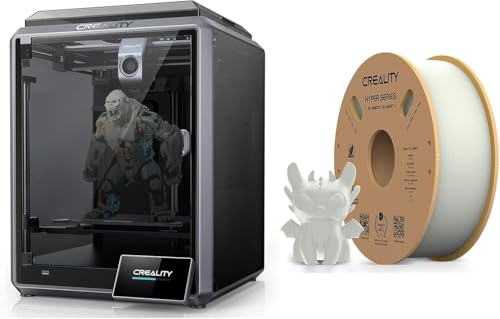
- SPEEDY TO REALIZE CREATIVE IDEAS: The Creality K1 fastest 3d printer desktop boasts remarkable speed, hitting 600mm/s with upgraded motion for 2000mm/s² acceleration and 250mm/s (5x) print speed. High-precision stepper motors drive each axis, with a steel shaft connecting Y-axis belts. Its high-torque 42-48 motor ensures lightning-fast, precise printing, rivaling Bambu Lab P1P. The K1 is an attractive choice for swift and efficient printing.
- HIGHER EFFICIENCY AND MORE ECO-FRIENDLY: The Creality K1 all-in-one 3d printers excels in efficiency and eco-friendliness, cutting print times with its 600mm/s speed. Enhanced productivity and quicker project completion result from this efficiency boost. Moreover, the K1's lower power consumption aligns with its eco-friendly design, offering a faster and greener 3D printing experience.
- STAND FIRMLY TO PRINT QUALITY MODELS: The Creality K1 3d printers for homeuse boasts a robust all-metal cube frame and classic Cartesian structure, ensuring steadfast stability for premium 3D printing. Thick linear shafts, gussets, cantilevers, and silicone bed mounts enhance stability by reducing vibrations, guaranteeing precise, detailed, and dimensionally accurate prints. The K1's solid construction yields top-notch model quality
Pros
-
Enclosed design helps temperature stability vs open-frame
-
Maker lists 220×220×250 mm build volume
-
Maker claims up to 600 mm/s and auto leveling/self-check
-
Tom’s review confirms the standard build volume and positions it as a “speedy” flagship-style printer
Cons
-
More machine than most “first printer” budgets
-
Enclosures can add noise/heat management quirks
Trade-offs / Who should skip
-
Skip if you only print PLA casually and want the simplest, cheapest path—an open-frame pick above is usually enough.
-
Failure case: if you expect plug-and-play and top-tier support, be ready to learn basic maintenance (like any fast FDM printer).
Scores: Performance 5/5 • Build Volume 4/5 • Ease of Use 4/5 • Value 3/5
Social proof: See reviews on Amazon.
Quick compare
-
Most beginner-friendly “classic size”: Ender-3 V3 SE
-
Best speed-per-dollar vibes: Kobra 2 Neo
-
Best for tiny desks: A1 mini (small 180 mm cube)
-
Slightly bigger bed + quiet claim: Neptune 4 Pro
-
Enclosed step-up: Creality K1
FAQs
What’s the cheapest 3D printer that’s still worth it?
I’d start around the printers that include auto leveling and a mainstream build size (like the Ender-3 V3 SE at 220×220×250 mm).
Is 220×220×250 mm big enough?
For most beginner projects: yes. It covers organizers, brackets, prototypes, and many cosplay parts (with slicing).
Do I need an enclosure?
Not for PLA. If your room has drafts, pets, or you want more temperature stability (or plan ABS/ASA), an enclosure like the K1 can help.
Which is best if I hate setup and calibration?
The A1 mini is widely reviewed as easy to use, with auto leveling and a compact footprint—just accept the smaller bed.
What filament should I start with?
PLA is the simplest starting point on all of these. Save ABS/ASA for later unless you have ventilation and (ideally) an enclosure.
As an Amazon Associate, I earn from qualifying purchases.