
Best Baby Monitors in 2026: 5 Picks for Safer Sleep and Peace of Mind
As an Amazon Associate I earn from qualifying purchases. Some links may earn us a commission at no extra cost to you.
A “best” baby monitor depends on one big choice: non-Wi-Fi (more private, simple, dedicated screen) vs Wi-Fi (check from anywhere, more smart features, depends on your network). For most parents, the real make-or-break is whether the parent unit lasts a full night without babysitting a charger—so I used portable parent-unit battery life (hours) as my primary scoring metric.
Top picks
Infant Optics DXR-8 PRO — Best for non-Wi-Fi privacy + interchangeable lenses
A dedicated, non-Wi-Fi monitor that stays popular because it’s simple and flexible. The interchangeable lens system is genuinely useful if your nursery layout changes.
Why it wins: non-Wi-Fi simplicity + flexible viewing in a “just works” package.

- ACTIVE NOISE REDUCTION (ANR): Active Noise Reduction (ANR) - Patent No. [11,875,769 B2] technology...
- YOUR BABY, ONLY YOUR EYES: No WiFi. No app. No cloud. Direct Private Signal with 2nd Gen FHSS...
- EASY BATTERY REPLACEMENT: Designed with real-life parenting in mind, the user-replaceable battery...
Pros
-
Interchangeable lenses for wide vs zoom views
-
Non-Wi-Fi setup (no router/app required)
-
Pan/tilt/zoom + night vision for easy repositioning
Cons
-
Battery can drop faster with screen always on
-
No remote viewing from outside the home
Social proof: See rating & reviews on Amazon.
Trade-offs / Who should skip
-
Skip if you need phone viewing while you’re away.
-
If you keep the screen on continuously overnight, expect more charging.
Scores: Performance 4/5 • Battery-life metric 3/5 • Ease of use 4/5 • Value 4/5
eufy SpaceView Pro (E210) — Best for long battery life without Wi-Fi
If you want a dedicated screen and you don’t want to fuss with Wi-Fi, this is the “set it and forget it” pick—especially for overnight audio monitoring.
Why it wins: standout stated battery life for a non-Wi-Fi monitor.
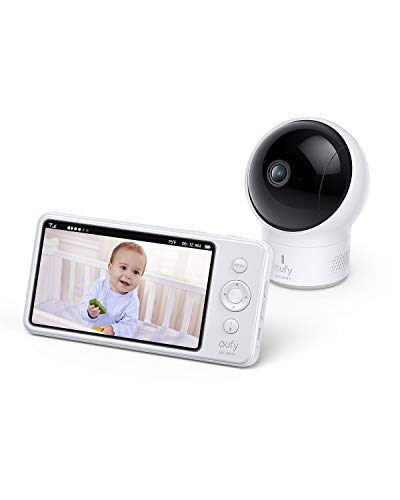
- Uninterrupted Vigilance: Enjoy 30 hours of default monitoring or 12 hours for intensive care with...
- Crystal-Clear Infant Watch: The sharp 720p clarity brings your baby's moments into high definition...
- All-Encompassing View: With a camera that pans 330° and tilts 110°, achieve comprehensive room...
Pros
-
Strong stated battery life for overnight monitoring
-
Non-Wi-Fi design appeals to privacy-focused families
-
Big screen + pan/tilt + night vision (typical for this class)
Cons
-
No remote viewing when you’re away
-
Fewer “smart” app features than Wi-Fi monitors
Social proof: See rating & reviews on Amazon.
Trade-offs / Who should skip
-
Skip if you want app clips/recording or deep analytics.
-
Range can drop in real homes with thick walls/floors.
Scores: Performance 4/5 • Battery-life metric 5/5 • Ease of use 5/5 • Value 4/5
VTech RM7764HD — Best for a big screen + Wi-Fi remote access
A hybrid approach: you get a large parent unit at home and phone access when you’re away.
Why it wins: big-screen convenience plus remote viewing.
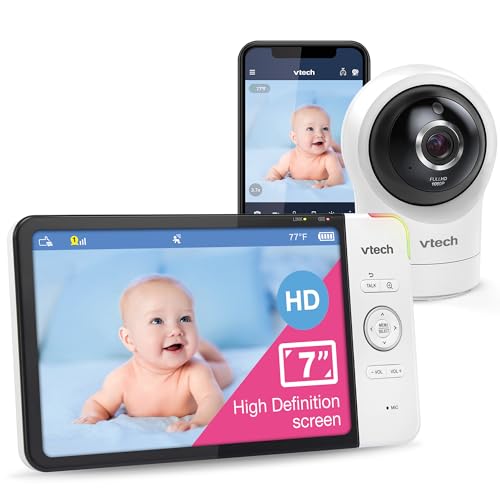
- [1080p FHD Remote & 720p HD Local viewing] - The camera transmits 1080p high-definition video, so...
- [Plug & Play Direct Mode. Remote Monitoring on iOS & Android Devices] - This advanced monitor system...
- [360 degree Pan & Tilt with 10X Zoom & 110 degree wide-angle lens] - Achieve 360 degree panoramic...

Pros
-
Large display is easy for quick glance checks
-
Remote access via Wi-Fi/app for travel or checking in
-
Pan/tilt/zoom + motion/temperature-style features (varies by setup)
Cons
-
Wi-Fi performance depends on your network
-
More setup/permissions than non-Wi-Fi options
Social proof: See rating & reviews on Amazon.
Trade-offs / Who should skip
-
Skip if you want maximum simplicity and no app setup.
-
If your Wi-Fi is weak in the nursery, a non-Wi-Fi monitor may be more reliable.
Scores: Performance 4/5 • Battery-life metric 4/5 • Ease of use 3/5 • Value 4/5
Nanit Pro — Best for sleep insights + checking from anywhere
If you want a monitor that’s more like a sleep dashboard (and you’re okay living in an app ecosystem), this is a top app-first option.
Why it wins: strong app experience and sleep-tracking ecosystem (often tied to memberships).
No products found.
Pros
-
Remote viewing + smart alerts through the app
-
Sleep-insight ecosystem is the main differentiator
-
Works well if you already like app-first baby gear
Cons
-
Full value often depends on a paid plan
-
No dedicated parent unit unless you provide a device
Social proof: See rating & reviews on Amazon.
Trade-offs / Who should skip
-
Skip if you don’t want an app-first experience or subscriptions.
-
If your priority is “always-on, no-internet,” choose non-Wi-Fi instead.
Scores: Performance 4/5 • Battery-life metric 1/5 • Ease of use 3/5 • Value 3/5
Babysense HD S2 (split-screen) — Best for twins or two rooms on one screen
For two kids/rooms, split-screen is the feature that changes your nightly routine.
Why it wins: easy two-camera viewing on one parent unit.

- Split-Screen HD Display with 2 Night Light Cameras: Keep an eye on both babies at once on a single...
- Hack-Proof, No WiFi & High Definition View: The 720 HD image on the large 5" display provides...
- Soothe & Comfort Your Baby: Use the white noise sound, two-way audio, or the programmed lullaby...
Pros
-
Split-screen is ideal for twins/siblings
-
Strong stated battery life for a dedicated parent unit
-
Non-Wi-Fi design keeps setup simple
Cons
-
Real-world range varies a lot by walls/floors
-
Not a fit if you want remote viewing while away
Social proof: See rating & reviews on Amazon.
Trade-offs / Who should skip
-
Skip if you only have one nursery and don’t need split-screen.
-
If you want app clips/recording, choose a Wi-Fi model.
Scores: Performance 4/5 • Battery-life metric 5/5 • Ease of use 4/5 • Value 4/5
Quick compare
-
Want no Wi-Fi + best overnight battery: eufy SpaceView Pro (E210)
-
Want non-Wi-Fi + flexible viewing: Infant Optics DXR-8 PRO
-
Want big parent screen + phone viewing: VTech RM7764HD
-
Want sleep insights + remote access: Nanit Pro
-
Want twins / two rooms on one screen: Babysense HD S2
FAQs
Are Wi-Fi baby monitors safe?
They can be, but they require strong passwords, updates, and a secure home network. If you want fewer internet-related risks, a non-Wi-Fi monitor avoids remote access entirely.
Do I need a subscription for smart monitors?
Some smart monitors offer basic live viewing without a plan, but deeper “insights,” history, and analytics are often tied to paid tiers. Check the current plan details before buying.
What’s the best baby monitor for travel?
A non-Wi-Fi monitor with a dedicated screen is usually easiest because you don’t have to set up hotel Wi-Fi or app permissions.
Should I choose a monitor with a big screen?
A bigger parent unit is great for quick checks and less squinting at night, but it can trade off against portability and battery life.
As an Amazon Associate, I earn from qualifying purchases.